In our CRM application we removed ‘Sales’ tab as per a business requirement.
Later as part of another requirement we installed ‘Activity Feeds’ managed solution in our application.
To our surprise ‘Sales’ tab resurfaced only with “What’s New” link.
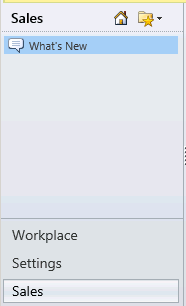
Fix –
To remove ‘Sales’ tab we followed below steps
- Extract ‘Activity Feeds.zip’ managed solution folder
- Open ‘Customizations.xml’ file
- Removed ‘Sales’ sub area xml node and Save ‘Customizations.xml’ file
- Zip the files and reimport the solution
- It should remove ‘Sales’ tab
Note – You can include “What’s New” link on Workplace or other tabs required as per your business requirement.
🙂


 Rajeev Pentyala – Technical Blog on Power Platform, Azure and AI
Leave a comment