Hi,
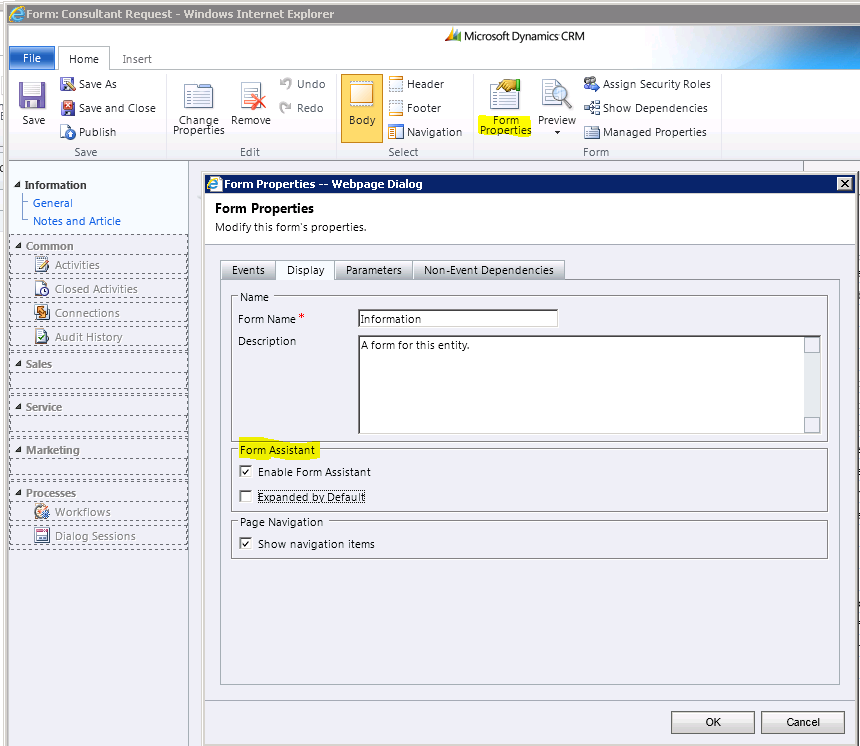
We can Enable/Disable and Expand/Collapse the ‘Form Assistant’ by default in CRM 2011 using Form properties.
Navigate to “Settings -> Default Solution -> Entity Customization Form -> Form Properties”
Form Assistant Settings
You can even use below JScript to hide/show the Form Assistant
document.getElementById(‘tdRelatedInformationPane’).style.display = ‘none’; // ‘none’ to hide and ‘block’ to show
🙂


![[Step by Step] Beginner : Create a PCF control and add it to a custom page](https://rajeevpentyala.com/wp-content/uploads/2024/12/image-49.png)
 Rajeev Pentyala – Technical Blog on Power Platform, Azure and AI
Leave a comment