In one of my requirement I have to call my custom WCF service method from plug-in.

In this scenario my plug-in is WCF client and I have to read client binding configuration from plug-in.

Below are the ways you can read the binding configuration details from plug-in

  • Synchronous plug-in
    • In case of synchronous plug-in, you can place binding configuration in root <web.config> file of CRM application server
    • Open the Web.config from path “C:\Program Files\Microsoft Dynamics CRM\CRMWeb\web.config
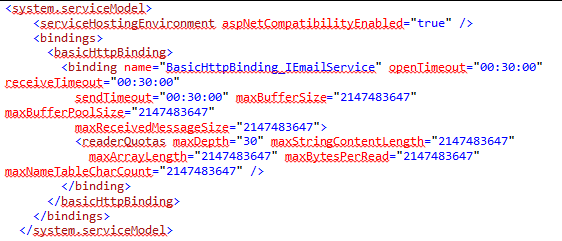
    • Find <System.ServiceModel> node and place the client binding configuration
    • After placing the configuration, the <System.ServiceModel> looks as below
CRM root Web.config
CRM root Web.config
  • Asynchronous Plug-in
    • Since async plug-ins host on “CRM Async Service”, place the configuration details in “CrmAsyncService.exe.config” file
    • Open the “CrmAsyncService.exe.config” file from path “C:\Program Files\Microsoft Dynamics CRM\Server\bin\CrmAsyncService.exe.config
    • Add <System.ServiceModel> node and place the client binding configuration
    • After placing the configuration, the <System.ServiceModel> looks as below
CrmAsyncService.exe.config file

🙂


Advertisements
Advertisements

One response to “Reading WCF client binding configurations from plug-in”

  1. Peter Avatar
    Peter

    Very interesting your node. But it doesn’t work for Iworkflow.
    And the file CrmAsyncService.exe.config, i created like you specify but nothing changes in my case, i’m unable to read servicemodel section from workflow trigger.

    Here is error i got :impossible to find default endpoint that references contract
Leave a comment
