Hi,
When we have relationship between two entities, the child entity link add to the left navigation of parent.
For example,
- “Contacts” link add to the left navigation of “Accounts”
Contacts Associated View In Account
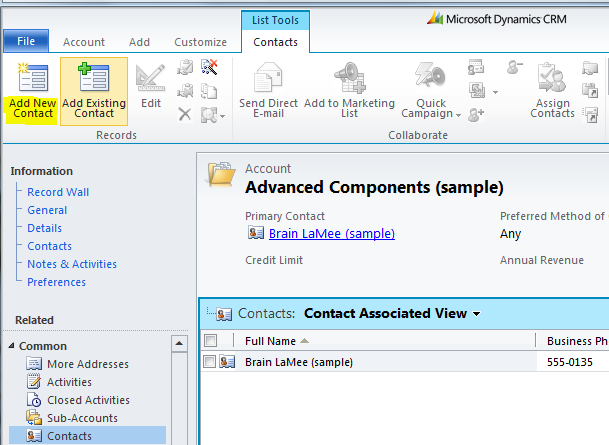
The view we call it as “Associate View” and it contains buttons with below naming convention
- “Add {Display name of child}” (i.e., “Add Contact” in above screen)
- “Add Existing {Display name of child}” (i.e., “Add Existing Contact” in above screen)
To rename the “Add & Add existing” buttons below are the steps
- Create a new solution
- Add child entity (i.e., Contact) in above example
- Export & Save solution in local folder
- Extract folder and open “Customizations.XML” in Visual Studio
- Find <RibbonDiffXml><CustomActions> node
- Add below XML
<CustomAction Id=”Mscrm.SubGrid.{Entity Name}.AddNewStandard.CustomAction” Location=”Mscrm.SubGrid.{Entity Name}.AddNewStandard” Sequence=”210″>
<CommandUIDefinition>
<!–New Button Id – AddNewStandard; Existing Button Id – AddExistingStandard–>
<Button Id=”Mscrm.SubGrid.{Entity Name}.AddNewStandard”
Command=”Mscrm.AddNewRecordFromSubGridStandard”
Sequence=”20″
LabelText=”My Custom Text”
Alt=”My Custom Text”
Image16by16=”/_imgs/ribbon/NewRecord_16.png” Image32by32=”/_imgs/ribbon/newrecord32.png”
TemplateAlias=”o1″ ToolTipTitle=”Add New Contact”
ToolTipDescription=”$Resources(EntityDisplayName):Mscrm_SubGrid_EntityLogicalName_MainTab_Management_AddNewStandard_ToolTipDescription” />
</CommandUIDefinition>
</CustomAction>
- Save, zip & Export solution
🙂


![[Step by Step] Beginner : Create a PCF control and add it to a custom page](https://rajeevpentyala.com/wp-content/uploads/2024/12/image-49.png)
 Rajeev Pentyala – Technical Blog on Power Platform, Azure and AI
Leave a comment