Hi,
In one of my XRM implementation i used OpenXML.sdk to read/write excel files.
I was getting below screen while opening the created excel file from .aspx page.
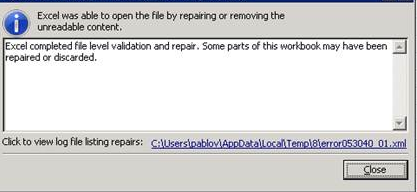
Here is the code Iused to pop the excel file from .aspx page
Response.ClearHeaders();
Response.ClearContent();
Response.ContentType = “application/vnd.openxmlformats-officedocument.spreadsheetml.sheet.main+xml”;
Response.AddHeader(“Content-Disposition”, “sample.xlsx”);
Response.BinaryWrite(outputFileBytes);
Response.Flush();
Response.End();
Fix :-
- There might be many reasons for this warning message
- In my case, I mistakenly added <script> tag to my ‘Response’ object
- So when you open the file, Excel application repairs the content by removing the <script> tag
- This is the reason you get the message window
- To verify whether the excel file corrupted
- Save the Excel file locally
- Open the Excel file with notepad
- Check if any <script> tag exists

Hope it helps 🙂


 Rajeev Pentyala – Technical Blog on Power Platform, Azure and AI
Leave a comment