Hi,

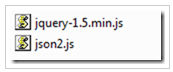
To use ODATA service in CRM 2011 you need two resource files
  •  json2.js
  • JQuery.js

Add these 2 files As Web resources in CRM System & As Libraries to the “Entity” which you are calling OData Service
Below is the code to check the current user’s Security Role using JScript & OData Service

//Pass the role which you want to check, as Parameter (i.e.,System Administrator etc…)

// It fetch the role information which you passed as parameter using OData Service

function UserHasRole(roleName) {

var serverUrl = Xrm.Page.context.getServerUrl();

var oDataEndpointUrl = serverUrl + “/XRMServices/2011/OrganizationData.svc/”;

oDataEndpointUrl += “RoleSet?$top=1&$filter=Name eq ‘” + roleName + “‘”;

var service = GetRequestObject();

if (service != null) {

service.open(“GET”,oDataEndpointUrl, false);

service.setRequestHeader(“X-Requested-Width”, “XMLHttpRequest”);

service.setRequestHeader(“Accept”, “application/json,text/javascript, */*”);

service.send(null);

var requestResults = eval(‘(‘ +service.responseText + ‘)’).d;

if (requestResults != null && requestResults.results.length == 1) {

var role = requestResults.results[0];

var id = role.RoleId;

//Get Current User Roles

var currentUserRoles = Xrm.Page.context.getUserRoles();

//Check whether current user roles has the role passed as argument

for (var i = 0; i < currentUserRoles.length;i++) {

var userRole = currentUserRoles[i];

if (GuidsAreEqual(userRole, id)) {

return true;

}

}

}

}

return false;

}

function GetRequestObject() {

if (window.XMLHttpRequest) {

return new window.XMLHttpRequest;

}

else {

try {

return new ActiveXObject(“MSXML2.XMLHTTP.3.0”);

}

catch (ex) {

return null;

}

}

}

function GuidsAreEqual(guid1, guid2) {

var isEqual = false;

if (guid1 == null || guid2 == null){

isEqual = false;

}

else {

isEqual = (guid1.replace(/[{}]/g, “”).toLowerCase() == guid2.replace(/[{}]/g, “”).toLowerCase());

}

return isEqual;

}

How can I call this function? :-

if(UserHasRole(‘System Administrator’)){

alert(“Current logged-in user is  System Adminstrator”);

}

Hope it helps 🙂

Advertisements
Advertisements

8 responses to “Check User Security Role in CRM 2011 using JScript”

  1. Roberto Lopez Avatar
    Roberto Lopez

    Hello,
    I tried your code and it was very helpful.
    the only problem I have that CRM keeps giving me an error. this is the error: The value of the property ‘if’ is null or undfined not a Function object.

    this is the if statement:
    If (UserHasRole(“Administrator”))

    the Json value returned is as follows:
    true {
    toJSON : function (key) { return this.valueOf(); }
    }

    it seems JavaScript does not understand this return value.
    Can you please tell me if I shoul do something differently within the IF statement.

  2. Roberto Lopez Avatar
    Roberto Lopez

    The problem is that JavaScript does not understand the JSON object. the value within the IF statement is not a boolean so when I do “UserHasRole”, it throws an error. I am not sure if I should upgrade to the latest version of jquery. I am using version 1.4.1..
    in advance,thanks for your help.

  3. Ritesh Avatar
    Ritesh

    Thanks Pentyala, this helped!

  4. Selva Antony Avatar
    Selva Antony

    Thanks Rajeev, it helps very much 🙂

  5. Rusty Avatar
    Rusty

    Pentyala, that helped a lot – but I found that it only works if there is a single Business Unit. If there are multiple BU’s in the enterprise then multiple BU’s are returned, and your function gets the FIRST one *only*. This may or may not be the right BU. The function should be modified as follows:

    STEP 1 – Download the XrmServiceToolkit from

    http://xrmservicetoolkit.codeplex.com/

    and install the XrmServiceToolkit.js file as a web resource. Add the web resource to the form library on whatever entity form you’re working with. The XrmServiceToolkit.js file must come *after* the JQuery and JSON2 libraries in the order.

    STEP 2 – Add the following function to the bottom of your your jScript file:

    function GetBusinessUnit() {
    var request = “” +
    ” +
    ” +
    WhoAmI” +
    “”;
    var resultXml = XrmServiceToolkit.Soap.Execute(request);
    var buid = resultXml.getElementsByTagName(“a:Results”)[0].childNodes[1].childNodes[1].text;
    return buid.toString();
    }

    STEP 3 – Modify the UserHasRole helper function to take a second parameter – this will be a string representing the current user’s business unit id.
    i.e.: function UserHasRole(roleName,businessUnit)

    STEP 4 – Modify the oDataEndpointUrl variable filter as follows:

    change the filter from this:
    oDataEndpointUrl += “RoleSet?$top=1&$filter=Name eq ‘” + roleName + “‘”;

    to this:
    oDataEndpointUrl += “RoleSet?$top=1&$filter=Name eq ‘” + roleName + “‘ and BusinessUnitId/Id eq (guid’” + businessUnit + “‘)”;

    STEP 5 – Now, tie it all together: Where you need to determine if a user has a particular security role in order to do something, do this:

    //declare a variable for the Business Unit:
    var theBU = GetBusinessUnit();
    //NOW check if the user has a particular role:
    if(UserHasRole(‘System Administrator’,theBU)){
    //do stuff
    }

  6. Alex Marshall Avatar

    Just using Xrm.Page.context.getUserRoles() is a much simpler solution.

  7. […] found this post, but I didn’t found it quite readable and the solution seemed too complex to […]

Leave a comment